‘Act Fast, Don’t Panic’: Experts Share What To Do If You Click On A Scam Link

If you’ve noticed more scam calls and increasingly convincing phishing emails recently, you’re not alone. The UK National Cybersecurity Centre (NCC) itself has said that “scams are getting smarter, and some even fool the experts”.

AI tools and voice cloning (where fraudsters use clips of someone’s voice to mimic a loved one on the phone) might make your online life feel increasingly fraught.

But what if you’ve already selected it by accident? Here, cybersecurity experts share their advice on what to do next.

General advice if you’ve clicked on a suspicious link

Tomas Stamulis, the chief security officer at digital privacy company Surfshark, said that you shouldn’t assume the worst if you’ve clicked on a suspicious link – though you should “act quickly”. In fact, all the experts we spoke to said speed matters here.

“Close the page straight away and avoid entering any personal information, passwords or payment details. If anything has downloaded or been installed, disconnect the device from the internet and run a full malware scan,” he added.

Neil Bayliss, director of IT support experts Hubtel IT, agreed that you should act immediately, but stressed you shouldn’t panic. “Scammers often count on you panicking and losing your ability to think rationally,” he explained.

And Stephen Bailey, director of client delivery at global cyber security company NCC Group, told us: “One of the biggest mistakes people make is delaying because they’re worried about admitting they clicked a link or opened an attachment.”

Both in your workplace or on a personal device, “taking action quickly can limit the damage and make it much harder for an attacker to gain further access”.

If you used, or think you might have used, a work account or device when entering your card details, contact your company’s IT team too, both Bailey and Bayliss shared.

What if I opened a link and shared my password?

Stamulis said that if you did enter some login details, change them from a “clean” device – not the one on which you received the scam email, text or call.

Start with your email address, he added, as access to your email can give hackers a path to other services via password changes. Stamulis advised using unique passwords and two-factor authentication.

Keep an eye on your bank, email, and “other important accounts for unfamiliar logins, password changes, or transactions over the following days and weeks,” he continued.

“Be particularly vigilant about unexpected calls, texts or emails offering to help with the issue, as scammers can use the situation to pose as a trusted company or support service and try to gather more information from you.”

What if I opened a link and shared financial details?

You should call your bank at once if you shared any financial information like your card or account details, stated Bayliss. “Make sure you use its official website or app, or call the contact number on the back of your card,” he said.

All the experts we spoke to said scammers might use the aftermath of a data breach to get more financial information from you, too.

Maybe your initial click on the link didn’t lead to any information they could use to directly draw money from your account.

But people should be very cautious of any unsolicited requests for credentials, financial information, or urgent action. “Instead, verify information through official channels and trusted sources before taking any action,” stated Bailey.

How can I report scam links?

Stamulis said that if the scam came via email, report it to your email provider and the National Cyber Security Centre. Don’t click on the link again, and don’t reply to the scammers.

You can also “forward suspicious emails to report@phishing.gov.uk and suspicious text messages to 7726 free of charge,” Bayliss said.

You can also report scam calls to 7726, per Ofcom. Just select the phone number that called you (don’t dial it), copy it and paste into a SMS message to 7726.

How can I spot scam links going forward?

“There used to be quite common signs of a scam such as spelling mistakes or suspicious-looking links, but some criminals use AI tools to create convincing and polished messages,” suggested Bayliss.

Scams have gotten more “sophisticated” but one giveaway can be a sense of urgency.

If you receive a message or call that tells you you need to take immediate action, like resetting a password or following a link, consider it suspicious.

Bayliss warned: “Don’t let yourself become pressured or lose sight of clear red flags.”

And Stamulis said you should “treat unexpected contact with caution, avoid clicking links in messages and go to the relevant website or app independently”.

“It is also worth changing any reused passwords, enabling two-factor authentication and keeping an eye out for unusual account activity or unexpected password-reset requests,” he said.

Share Button

Trying To Get Tickets For Glastonbury 2027? An Expert Shares 5 Genius Browser Hacks

After a fallow year in 2026, Glastonbury is returning next year, with tickets for the event finally set to go on sale on Sunday 4 October.

Famously, the Glasto ticket run is no mean feat. Tickets usually sell out within an hour, as thousands of music fans from around the world battle to secure their spots at Worthy Farm.

Any gig-goer will tell you that the gig-buying trenches are real, and far from getting you hyped for the event, trying to nab a ticket for a highly sought-after show is nothing short of a nightmare.

However, the experts at open-source web broswer Firefox have shared their five expert tips for preparing your browser for the ticket wars ahead of time, giving you the best possible chance of getting Glastonbury tickets.

Glastobury’s iconic Pyramid Stage in 2023

via Associated Press

Top browser tips for securing Glastonbury tickets

Update your browser before ticket day – not five minutes before

Is there anything more frustrating than feeling like you are just about to sort tickets and then your browser needs an update?!

An out-of-date browser is the last thing you want to be dealing with when tickets go live. Check for any browser or system updates well in advance, and restart your device beforehand if needed. This reduces the chance of an unexpected update, restart or compatibility issue interrupting you at the worst possible moment.

Get your autofill in order

When you’re under pressure, even typing out an address can feel like it takes forever. Check the information saved in your browser’s autofill ahead of time and make sure names, addresses and other relevant details are accurate. It can save you from frantic typing – or spotting an old address just as you’re trying to complete your purchase.

Don’t assume more tabs mean more chances

It’s tempting to open tab after tab in the hope that one will magically get through first, but more isn’t necessarily better. Multiple tabs can quickly become confusing, particularly if the ticketing system uses a queue or session-based process.

Additionally, some websites detect this behaviour and ban you all together which is, needless to say, a nightmare.

Follow the ticket seller’s official guidance and avoid turning your browser into a sea of identical tabs you can’t keep track of.

Give your browser some breathing room

Before the sale starts, close as many unused tabs as possible. Keeping lots of tabs open can use up system memory, particularly if you’re also running other applications in the background – the last thing you want when you’re trying to secure a ticket.

Sort your logins before the countdown begins

Don’t wait until tickets are live to discover you’ve forgotten an important password. Check ahead of time that you can access any accounts you’ll need and have the necessary details to hand.

When is Glastonbury 2027, and when do tickets actually go on sale?

Worthy Farm will be reopening its doors on Wednesday 23 June 2027, with the main events lasting until Sunday 27.

General admission tickets will go on sale at 9am on Sunday 4 October.

Share Button

The Google Pixel 11 Pro Just Dropped In Price: Here’s How To Get The Best Deal

We don’t need to tell you this: tech is expensive. Keeping up to date with the latest gadgets can put a serious dent in your wallet, but the price tag doesn’t do much to quell our desires for a new phone.

Especially when one as enticing as the Google Pixel 11 Pro drops.

Available for pre-order now, and to buy from 20 August, the Pixel 11 Pro comes in four shades (Canyon pink, Olive green, Fog blue and Obsidian black).

The phone retails at £1,079, which is up nearly £500 from the Pixel 10. But, good news Google heads: you can get it for less when you trade in an old device.

Eligible devices include phones from Google, Samsung, and Apple, among tons of other brands, so if you’ve been thinking about switching to Google, this is as good a chance as any.

Depending on the phone you’re trading, you could save up to £850, which in case you need a little help with the maths, means your new phone could cost as little as £229. Woah.

When you consider the array of upgrades Google has made from its predecessor, the Pixel 10, that’s an insane steal.

The first Google phone to use its Tensor G6 chip, it’s considerably speedier than the Pixel 10, with Google claiming you’ll see 25% speedier browsing and 3.5 times faster Gemini processing.

Speaking of, the Pixel 11 Pro is loaded with Gemini Intelligence, which can help you with everything from brainstorming to finding information.

The camera is often the most important aspect of a phone (for us, at least) and this one delivers big time. Pixel 11 boasts Google’s longest zoom yet (up to a whopping 120x) and 30% better light sensitivity so your photos always come out looking crisp and sharp.

One of our favourite elements is Magic Capture mode, which means you can simply press a single button to let your phone take over the heavy lifting of taking photos and videos, so you don’t have to think about the best mode to capture the moment.

The offer runs until 1 September, so run, don’t walk – because you could miss out on £850 in savings on the Pixel 11 Pro as well as up to £260 when you trade in a smart watch for the new Google Pixel Watch 5.

Share Button

Huge Savings Alert: Here’s How To Get Up To £850 Off When You Buy The New Google Pixel 11 Pro

We don’t need to tell you this: tech is expensive. Keeping up to date with the latest gadgets can put a serious dent in your wallet, but the price tag doesn’t do much to quell our desires for a new phone.

Especially when one as enticing as the Google Pixel 11 Pro drops.

Available for pre-order now, and to buy from 20 August, the Pixel 11 Pro comes in four shades (Canyon pink, Olive green, Fog blue and Obsidian black).

The phone retails at £1,079, which is up nearly £500 from the Pixel 10. But, good news Google heads: you can get it for less when you trade in an old device.

Eligible devices include phones from Google, Samsung, and Apple, among tons of other brands, so if you’ve been thinking about switching to Google, this is as good a chance as any.

Depending on the phone you’re trading, you could save up to £850, which in case you need a little help with the maths, means your new phone could cost as little as £229. Woah.

When you consider the array of upgrades Google has made from its predecessor, the Pixel 10, that’s an insane steal.

The first Google phone to use its Tensor G6 chip, it’s considerably speedier than the Pixel 10, with Google claiming you’ll see 25% speedier browsing and 3.5 times faster Gemini processing.

Speaking of, the Pixel 11 Pro is loaded with Gemini Intelligence, which can help you with everything from brainstorming to finding information.

The camera is often the most important aspect of a phone (for us, at least) and this one delivers big time. Pixel 11 boasts Google’s longest zoom yet (up to a whopping 120x) and 30% better light sensitivity so your photos always come out looking crisp and sharp.

One of our favourite elements is Magic Capture mode, which means you can simply press a single button to let your phone take over the heavy lifting of taking photos and videos, so you don’t have to think about the best mode to capture the moment.

The offer runs until 1 September, so run, don’t walk – because you could miss out on £850 in savings on the Pixel 11 Pro as well as up to £260 when you trade in a smart watch for the new Google Pixel Watch 5.

Share Button

We’ve Found The Snoop-Free Solution To Keeping Your Kids Safe Online

You can breathe a big sigh of relief: we’re half way through the summer holidays (unless you’re in Scotland, sorry Scotland!).

While you might have set strict no-screen rules at the beginning of the summer holidays, we’re sure you’re getting to the point of easing up.

And no one would blame you – it’s a long time to have the whole family under one roof.

All you have to do is get through the next few weeks – and if that means plonking them down to play games or talk to their friends as a distraction, so be it.

At the same time, though, there is plenty to think about when giving your child access to the internet. I don’t need to recount the potential horrors, because over 90% of parents on Mumsnet say current smartphones aren’t safe enough for children.

Plus, 77% of parents say keeping their child safe online feels like an impossible task, and that only gets harder in summer when they don’t have the school routine to keep them busy.

If you’re just about wondering when someone’s going to do something about this mess, enter: the OtherPhone.

Responding to readers’ concerns, the team at Mumsnet teamed up with two London-based tech companies – Nothing and SafetyMode – to create a phone catered to keeping kids safe online.

It might look like a regular phone, but it’s actually a cool phone – that is, the 3(a) phone from cult brand Nothing – that your kid will love (all you need to know is that Charli XCX is the ambassador).

The phone is super lightweight, coated in tempered glass, and is dust and water-resistant, so it can handle the muck and clutter of being a kid.

Loaded with all the regular functions of a smart phone, this particular phone also comes with SafetyMode, a software that uses AI to monitor, filter and block harmful content (like bullying, nudity, and explicit language) across every app your child uses.

While safety tools track a list of basic keywords, or block specific websites, SafetyMode has been trained to read content, which means it can distinguish between a normal conversation and a concerning one.

It can track their locations, and the filters are fully customisable, so you get to decide what you want your child accessing, based on their changing needs.

When troubling content is detected, SafetyMode will send an alert straight to your phone, so that you can rest assured you’ll know what your child is up to online, even when you’re not in the same room (or home!).

Even better, your child’s data won’t ever leave their phone, as all of the processing happens on the phone itself, for added privacy.

If you don’t want to buy a whole new phone, you don’t have to. SafetyMode is also available via the Google Play store to be compatible with any Android device.

The app itself is free, but if you want to manage permissions and filters without even having to pick up their phone, you can upgrade and pay £5.99 per month for SafetyMode Plus.

That means online safety for the rest of the summer, whether they’re at summer camp, the grandparents’, or simply curled up in their rooms.

Share Button

Most People Have No Idea What ‘PDF’ Stands For, But You’re About To Find Out

You’ve probably sent and opened thousands of PDFs over the years. But if someone asked you right now what PDF actually stands for, would you know the answer?

You’re not alone if you don’t. The word has become so embedded in everyday language that most people use it the way they use terms like “Wi-Fi” and “pm” ― automatically and without any particular thought about what the letters mean.

But it’s never too late to learn the answer to that mystery, as well as the interesting history behind those three letters. (And no, it doesn’t stand for “Please Download Fast” or “Pretty Delightful File.”)

“PDF stands for ‘portable document format,’ though I’m not sure anyone knows or cares anymore,” said Lisa Gitelman, a media historian and professor at New York University. “’PDF’ stands as the name of a digital file format on its own.”

She has written extensively about the PDF as a cultural and technological artifact, including in her book Paper Knowledge: Toward a Media History of Documents.

“The keyword is ‘portable’ because the format was designed to keep a document looking exactly the same, no matter which computer, operating system or device it was opened on,” said Madeline Enos, a language trends expert at the language learning app Preply.

“Before PDFs became widespread, sharing documents could be frustrating because fonts, images and layouts often changed depending on the software being used. The PDF solved that problem by preserving the original formatting, which is why it’s still one of the most trusted file formats over 30 years later.”

The origins of the PDF go back to 1991, when Adobe Systems co-founder John Warnock proposed a project called “Camelot” with the goal of developing a simplified way to view and print any document across devices and platforms, regardless of the software or hardware used to create it.

“At the time, the web was far less standardised than it is today, so creating a document that looked identical everywhere was revolutionary,” Enos noted.

Warnock’s Camelot project culminated two years after his original proposal, with the release of PDF 1.0, bundled with the first version of Adobe Acrobat.

The origins of the PDF go back to the early 1990s.

merovingian via Getty Images

The origins of the PDF go back to the early 1990s.

“PDF first appeared in the marketplace in 1993,” said Duff Johnson, CEO of the PDF Association. “Adobe, which invented PDF, continued its development until 2007, at which point the specification for PDF was handed to ISO for international standardization as a vendor-neutral technology.”

As the online environment has evolved significantly since the ’90s, so too has the PDF, Gitelman noted. Still, the file format remains an important standard.

“I once wrote an essay laying out four reasons for its enormous success,” Gitelman said. “First, PDFs offer page images – like facsimiles, like xeroxes, like microfilm, unlike word processing files or most proprietary eBook formats. This means they feel stable. They retain layout as well as content. Second, as page images, they are handy in publication workflows. Every book, every analog publication, has been a PDF somewhere in its life history. Third, they are easily transmissible across digital networks, even in low-bandwidth environments.”

The fourth and final reason: PDFs are searchable, she added.

Today, people still use the term PDF in everyday conversation, particularly in the context of work.

“We’ve certainly noticed that ‘PDF’ is used synonymously with ‘document’ and ‘file,’ as in ‘I sent him a PDF’ and ‘The email includes three PDFs,’” Johnson noted. “But the industry accepts such usage as the price of ubiquity.”

Many people also say “PDF file,” which is not quite redundant, as in the case of “PIN number” or “ATM machine.” But the term PDF does stand alone.

“Most people don’t stop to mentally unpack what the letters stand for, so adding ‘file’ simply makes the meaning clearer,” Enos said.

Still, the meaning is quite clear to most people these days.

“Most acronyms stay within specialist industries, but PDF made the rare jump into everyday language. Today, people don’t just recognise the letters – they also use ‘PDF’ as a verb,” Enos said. “It’s increasingly common to hear someone say ‘Can you PDF it?’ or ‘Just PDF that document,’ showing how technical abbreviations can become everyday words over time.”

This is a process known as lexicalisation, as the abbreviation became so familiar that it was accepted as a normal standalone word in the English language.

“While countless digital buzzwords have come and gone over the past three decades, ‘PDF’ has remained relevant because it describes a format rather than a trend,” Enos said.

The meaning of PDF has hardly changed over time, and it has gone international as well.

“PDF is one of the few digital abbreviations that has become almost completely language-independent,” Enos said. “Whether you’re in the UK, Japan, Brazil or Germany, the acronym ‘PDF’ is almost always recognised and rarely translated.”

Thus, PDF has essentially become a universal language in some ways.

“It’s a good example of how technology creates a shared international vocabulary,” Enos said. “Even people who don’t speak the same language often understand terms like PDF, Wi-Fi, USB and GPS, making them some of the closest things we have to truly global words.”

Share Button

Delete Photos Of Your Kids Online Before They Become ‘Landmines’, Warns Author

A parenting author and columnist has urged other parents to delete all the photos they’ve shared of their kids online – warning that these pictures are like “landmines” waiting to go off as children grow up.

Plenty of parents share photos, videos and details of their children’s lives online – usually on social media or in private groups – a phenomenon known as ‘sharenting’.

But this increasingly comes at a cost. Other children and teens can easily find these photos online and then turn them into cruel memes, deepfake videos (some of which can be pornographic) or share them around school to cause embarrassment.

Lorraine Candy, a journalist and author of ‘Mum, What’s Wrong with You?’: 101 Things Only Mothers of Teenage Girls Know, shared: “I think we need to go back and delete all the pictures we have ever shared – even in private Facebook groups or on private WhatsApp channels – of our children when they were younger.”

Explaining the reasoning for this statement, she said when kids reach their tween and teen years, those photos on social media are “landmines” for them and it can be “really upsetting” that other people can see them and they might get shared around.

“Imagine your worst teenage bully at school, imagine your worst friendship group where you feel very insecure and vulnerable, imagine them having access to pictures of you in a bath when you were a baby, to posts about you having a poo,” she said in an Instagram reel.

The author continued: “I know you can say it’s in a private group, it won’t get shared. [But] It does get screenshot, it does get shared. Other children have access to their parents’ private groups.”

Candy, who has four children, noted it’s “really important to a developing mind, as a teenager, that they don’t have these little bombs going off in the background emotionally as they’re developing their identity and their autonomy and their privacy”.

Plenty of people resonated with the post. “I mentor teenagers and would always recommend that parents do this. Online photos can cause all sorts of issues further down the line,” said one commenter.

“I’ve thought about this a lot over the years. I’ll have the conversation with my 12-year-old son this weekend and see how he feels about it. It’ll be so difficult to erase them because my Instagram is like a memory book of his childhood!” added another parent.

One mum recalled how she received a “barrage of requests” from her daughter’s friends to connect with her on Instagram (back when her daughter was 13).

“When I asked my daughter she said they were only sending these requests to access pics of her when she was younger – for jokes, basically. It was a real moment of enlightenment for me,” she added.

It’s not just bullying and deepfake creation that can be an issue as a result of sharenting. Images – whether real or fake – can also be used to intimidate or blackmail teenagers, as well as to commit identity theft and fraud.

Share Button

‘Bank Account Cleared By A Threenager’: Don’t Make This Expensive Mistake When Handing Kids Your Phone

Parents have opened up about the dangers of leaving kids to their own devices on their devices, after a viral post showed how easily a child was able to spend their parents’ money while using their iPad.

In January, parenting influencers Cole and Abbie shared their son had been on a secret shopping spree on their iPad, paying for a load of Apple services. “I didn’t think it was possible without my Face ID but here we are. Massive lesson learnt,” wrote the influencers at the time.

They weren’t the only ones to fall victim to it, either.

In response to Cole and Abbie’s misfortune, one commenter said: “It’s a parental right of passage to have your bank account cleared by a threenager. Mine did it on Amazon through the Alexa buying fart sounds.”

Another said: “My son wanted a rabbit so, while playing games on my phone, went on to Amazon and brought a hutch for £150, didn’t realised till it turned up at my door… and his answer was ‘can I have my rabbit now?’.”

“Been there done that!” added another parent, noting their child had purchased 100 fidget toys and 100 lip balms. Eek.

With kids still off school, experts from Protect Your Bubble are urging parents to check one particular setting on their devices to stop their bank accounts from accidentally being emptied.

James Brown, director at Protect Your Bubble, said: “It’s easy to assume that payments need passwords or additional approval; however, many devices and accounts allow instant spending once a card is saved to the account.”

He continued: “From a child’s perspective, it doesn’t feel like spending real money; however, for parents, it can mean hundreds, or even thousands, disappearing before they notice.”

How to stop kids from spending all your money online

First of all, turn off one-touch payments on devices and require approval for every purchase. “This single change can stop accidental spending instantly, and it takes less than two minutes to set up,” Brown said.

Households using Apple devices with Family Sharing set up should also turn on Ask to Buy, which blocks all purchases until they are approved.

Games consoles are also an easy way to wrack up debt. Brown noted they are “often overlooked, despite being one of the biggest risks”.

“Saved card details on PlayStation, Xbox, and Nintendo accounts can lead to purchases stacking up quickly,” he noted.

The expert recommends removing saved payment cards from accounts and setting monthly spending limits in console settings. You can also enable PINs or passwords for purchases.

“Consoles are where costs could spiral fastest,” he ended. “Prevention is far easier than trying to recover the money afterwards, and this is one of the most important tech checks parents can make this winter.”

Share Button

Kids And Teen Accounts On YouTube Are Changing – Here’s What Parents Should Know

YouTube has revealed it’s changing children’s accounts in the UK to help parents keep kids safer online.

The update comes as the UK government faces growing calls to follow in Australia’s footsteps and ban social media for under-16s.

A petition to ban it has garnered 25,000 signatures (at the time of writing) and prime minister Keir Starmer has now said he’s open to the idea of a similar ban here in the UK.

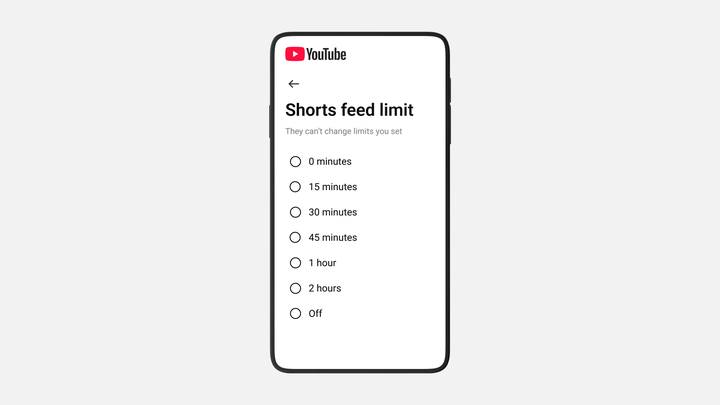
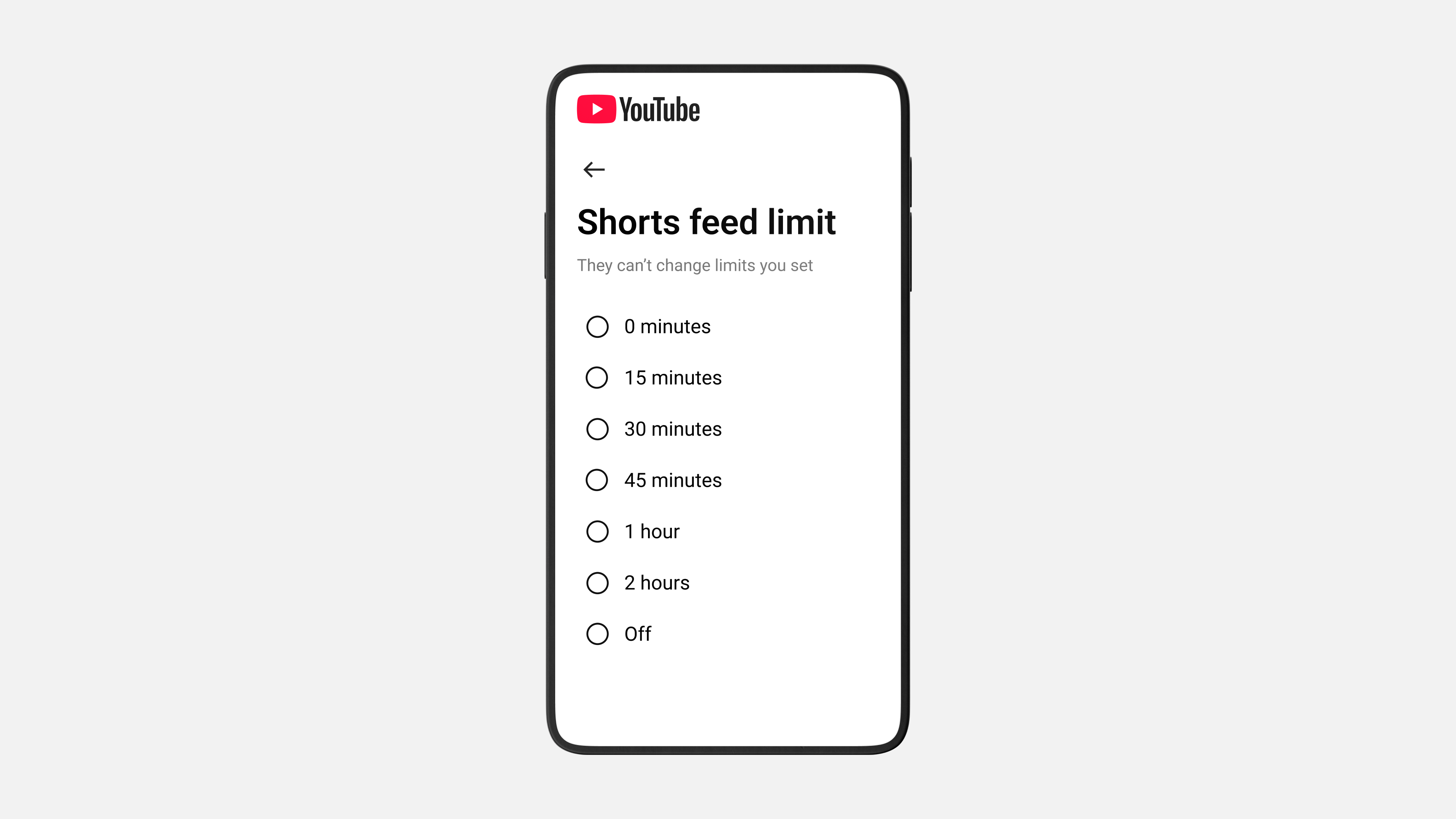
In a bid to improve the wellbeing of young users, YouTube has revealed parents will now be able to set time limits for scrolling Shorts, and will also enable caregivers to set bedtime and break reminders.

Parents will be able to set limits for scrolling Shorts

As part of the Online Safety Act, social media companies have a duty to protect children and stop them from accessing harmful or age-inappropriate content. Sites can face fines or be blocked in the UK if they don’t take protective steps.

The social media and online video sharing platform is also launching new ‘Quality Principles’ for content creators, developed alongside experts, to ensure videos created for teens are “age-appropriate” and “enriching”.

What are the quality principles?

Professor Peter Fonagy, head of the division of psychology and language sciences at UCL, which partnered with YouTube to provide evidence-based insights on adolescent development, said: “The mental health of children and young people is a global concern, and in the digital age the content teens encounter online can have both positive and negative impacts.”

He said the new quality principles will give creators a “practical, research-informed roadmap for making videos that are developmentally appropriate, emotionally safe, and genuinely supportive of young people”.

The principles include:

  • Joy, fun and entertainment: Show humour and warmth that lift teens’ moods like a day-in-the-life video or funny, self-accepting outtakes.
  • Curiosity and inspiration: Encourage exploration through creative tutorials, behind-the-scenes demos, or new hobbies that are easy to try.
  • Deepening interests and perspectives: Create deeper dives into subjects teens love, like music, gaming, or fashion, and show process, not just outcomes.
  • Building life skills and experiences: Offer relatable guidance for real-life moments, like teamwork or budgeting, to help them prepare for the future.
  • Credible information that supports well-being: Share accurate, age-appropriate information. Use trusted sources and avoid spreading misinformation.

Tell me more about the screentime limits…

YouTube said parents will be able to set time limits for scrolling Shorts – including having the option to set the timer to zero.

This gives parents flexibility to set the Shorts feed limit to zero when they want their teen to use YouTube to focus on homework, for example.

Or they could change it to 60 minutes during a long car trip to keep kids entertained.

Parents can also set custom Bedtime and Take a Break reminders.

There’s also a new account-making process

This has been designed to make it easier for parents to create a new kid account and switch between family accounts in the mobile app, depending on who’s watching, so they’re shown the most appropriate content for their age.

Dr Garth Graham, global head of YouTube Health, said: “We believe in protecting kids in the digital world, not from the digital world. That’s why providing effective, built-in tools is so essential, as parents play a critical role in setting the rules for their family’s online experiences.”

According to the social media giant, the updates will be rolling out from 14 January and will expand globally over the coming months.

Share Button

What Is Cloudflare, And Why Does It Affect So Much Of The Internet?

Much of the internet has been experiencing issues today as tech company Cloudflare suffered a major technical problem.

X (formerly Twitter) and ChatGPT are some of the sites which could not show all of their content when the problems arose.

A spokesperson for Cloudflare told The Guardian earlier today that they “saw a spike in unusual traffic to one of Cloudflare’s services beginning at 11:20am”.

This then “caused some traffic passing through Cloudflare’s network to experience errors”, they noted.

“While most traffic for most services continued to flow as normal, there were elevated errors across multiple Cloudflare services.

“We do not yet know the cause of the spike in unusual traffic. We are all hands on deck to make sure all traffic is served without errors. After that, we will turn our attention to investigating the cause of the unusual spike in traffic.”

But what is Cloudflare to begin with, and why does it affect so much of the internet if the company experiences an issue?

What is Cloudflare?

Cloudflare describes itself as “one global cloud network unlike any other”.

It helps sites to manage and secure internet traffic, ensures that the content of lots of sites can load safely, and protects sites from malicious attacks.

In layman’s terms, Cloudflare works behind the scenes to get the content sites want to give us to our screens safely.

Why do Cloudflare issues affect so much of the internet?

As we mentioned, the company helps to deliver a lot of the web’s content.

So when it’s down, or if it experiences technical problems, it doesn’t just affect one company.

“Today about 20% of the web runs through Cloudflare’s network,” the company wrote in 2024. This equates to millions of customers.

As a result, Cloudflare hiccups can have knock-on effects on multiple sites.

Which sites are affected by Cloudflare issues?

ChatGPT, X, and some transit sites (reportedly, the New Jersey transit system was affected, for instance) appeared to experience issues which may be linked to Cloudflare’s tech problems.

Shopify, Dropbox, Coinbase, online game League of Legends, Moody’s and NJ Transit also had problems today.

There may be many other sites involved, too (TechRadar, for instance, reported its internal HR system was affected).

When will the Cloudflare outage be fixed?

We don’t yet know when all of the problems will be fixed as of the time of writing.

But there’s good news: Cloudflare’s latest update (14:34, November 18) reads: “We’ve deployed a change which has restored dashboard services. We are still working to remediate broad application services impact.”

Share Button